
Did you know you can create unlimited temporary or sub-addresses from your single primary email inbox? This article covers a script and technique that makes this possible without actually creating new accounts.
What’s the idea behind unlimited email aliases?
The concept relies on a feature already built into most major email services (like Gmail): any message sent to yourname+anything@gmail.com actually lands in the yourname@gmail.com inbox itself, because everything after the “+” is ignored by the server but stays visible to you for sorting and filtering. The script or tool covered here makes generating and managing these sub-addresses easier and more organized than typing them manually every time.
Why would you need this?
When signing up on a new site you don’t fully trust, instead of handing over your primary email directly, you can create a dedicated alias for it. If that site starts sending you spam or sells your email to a third party, you’ll know exactly where the leak came from and can block that specific alias without affecting your main inbox at all.
Key Practical Benefits
- Track leak sources – you know exactly which site leaked or sold your email the moment you see which alias shows up in spam.
- Automatic filtering – you can create mail rules based on the alias part to keep your inbox organized.
- No need for multiple actual email accounts – everything lands in one inbox you manage easily.
- Completely free since it relies on a feature already built into your mail service.
Pros
- Zero cost – the feature is built into your existing mail service.
- Easy to understand and apply even for non-technical users.
- Improves your personal digital security by reducing exposure of your real email.
- No software installation required – just a mindset shift in how you use your email.
Cons and Limitations
- Some sites detect the “+” pattern and reject it at signup, treating it as an attempt to game the system.
- This method doesn’t actually hide your primary email – it only adds a layer of organization and tracking, since anyone who sees your alias can guess the original (yourname@gmail.com) easily.
- For genuinely deeper privacy (fully hiding your real email), you need a dedicated email-forwarding service instead of this simple method.
How to Use It
- Identify your primary email, e.g., yourname@gmail.com.
- When signing up on any new site, use the format yourname+sitename@gmail.com.
- Create an automatic filter rule in your mail settings that links any message containing “+sitename” to a dedicated folder or label.
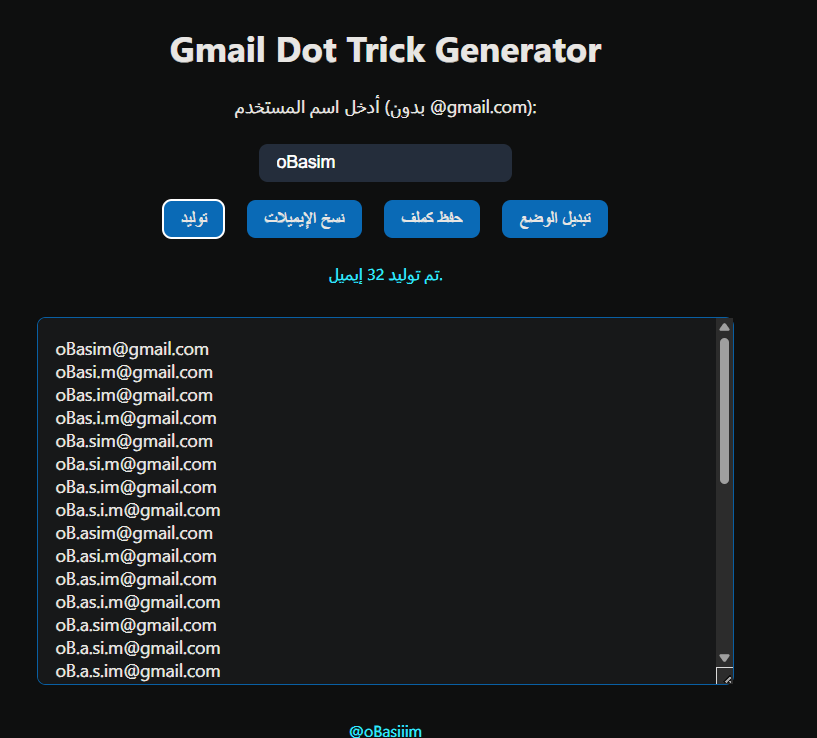
- If you want to automate generating and tracking these addresses in an organized way, use the dedicated script or tool for this instead of typing them manually each time.
Tips for Safe Use
- Document the aliases you’ve created somewhere organized (a simple spreadsheet) so you remember which one you used for which site.
- Check your spam folder periodically to make sure the automatic filtering is working as expected.
- Don’t rely on this method alone as a complete security solution – it’s an extra organizational layer, not a substitute for strong passwords and two-factor authentication.
Alternatives for Deeper Privacy
If your goal is to fully hide your real email rather than just organize it, services like “SimpleLogin” or “AnonAddy” (both partially open source) create genuine dummy email addresses that forward messages to your real inbox without ever exposing it to any third party.
FAQ
Does this method work with every email provider?
It works with most major services like Gmail and Outlook, but some smaller providers may not support the “+” routing format.
Can anyone figure out my real email from the alias?
Yes, since the base part before the “+” stays visible – this method is for organization and tracking, not full identity concealment.
Do I need to pay for this?
No, the core idea is entirely free since it relies on a feature already built into your existing email.
Conclusion
Generating unlimited email aliases from your primary inbox is a simple, free way to organize your digital life and track who’s misusing your email. It’s not a complete anonymity solution, but it’s an excellent practical step anyone can set up in minutes.


