
Windows search takes minutes to find one file. Everything shows results while you’re still typing the second letter. Free and open source.
This tiny app (under 2MB) indexes every file on your PC within seconds of launching. After that, any search you type comes back instantly, with zero waiting.
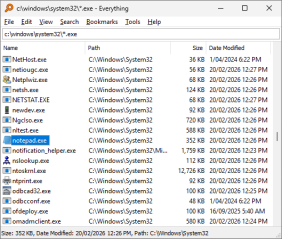
Why is it faster than Windows Search?
Windows Search scans file contents every time you search, which is why it lags. Everything reads the file system’s own index (the NTFS Master File Table) instead of scanning anything, so results appear instantly.
What it does best
- Instant keystroke search: results update live as you type.
- Full drive indexing: millions of files indexed in seconds.
- Advanced filters: search by extension, size, date modified, even regex.
- Portable version: run it with no install, carry it on a USB drive.
Getting started
Download the portable or installer version, launch it, and wait a few seconds for the first index to build (shown in the status bar). Then just type any part of a filename into the search box.
FAQ
Does it work on Mac or Linux?
No, Everything is Windows only. Alfred on Mac or Ulauncher on Linux are alternatives, though neither matches its raw speed.
Can it search inside file contents?
The core version searches names and paths only. Content search is available in the newer Everything 1.5 as an add-on feature.
Will indexing slow down my PC?
No, indexing reads the file system’s existing NTFS record instead of scanning your drives, so you won’t notice any performance impact.
Bottom line
If you hunt for files manually every day, this saves real time. Install it once and you’ll forget what the default Windows search felt like.
Link : voidtools.com


