
Just want to cut the intro off a video? Do not open a heavy editor and wait an hour for a render. LosslessCut does it in seconds, at the exact original quality.
Normal editors decode and re encode your video, so you lose quality and time. LosslessCut copies the segments directly with no re encoding: the output is identical to the source, and it finishes almost instantly.
What is LosslessCut?
LosslessCut is a free, open source tool built on FFmpeg. It does one thing extremely well: cut, trim, merge and clean up video files without touching quality. It is not a replacement for your editor, it is the tool you use before it.
When you need it
- Cut an intro or an ad out of a downloaded video.
- Trim a long screen recording before uploading.
- Clip a moment from a match or a movie to share.
- Merge several clips of the same format into one file.
- Remove an audio or subtitle track from inside the file.
How to use it
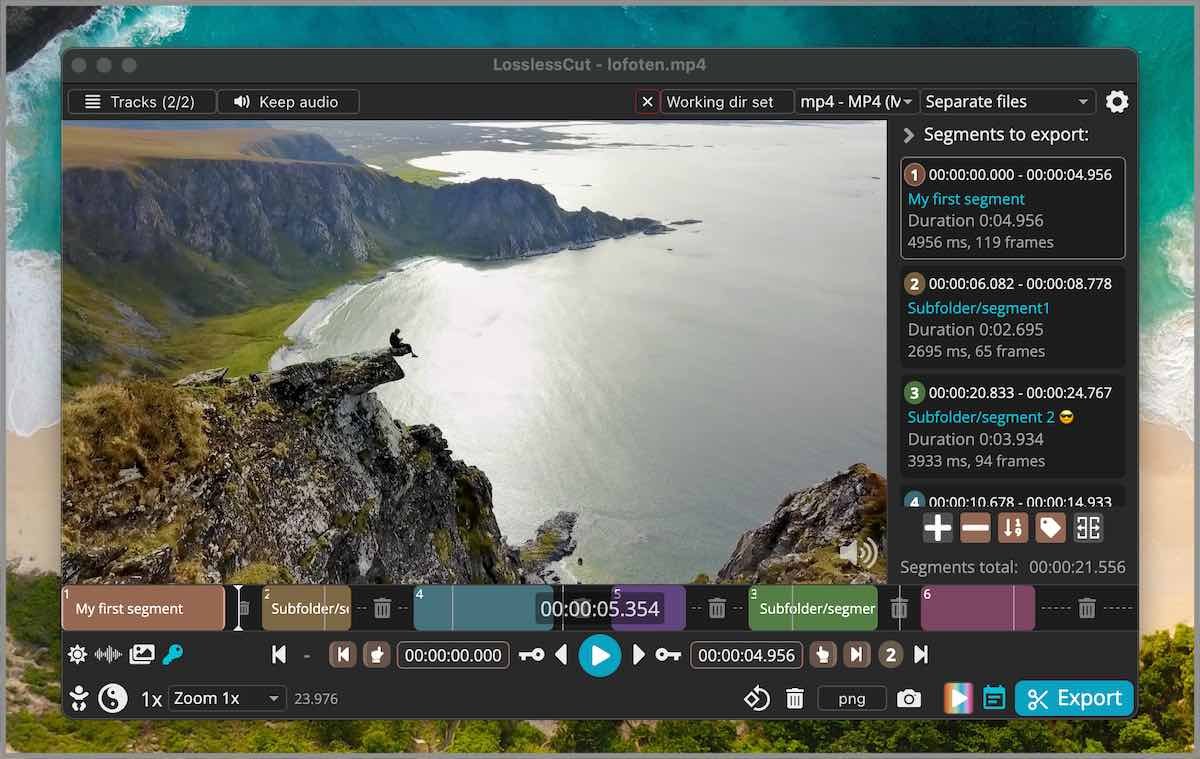
- Drag your video into the app.
- Press I to mark the start and O to mark the end.
- Add more segments if you want, and choose separate files or one merged file.
- Hit export, and it is done in seconds at full quality.
Why quality stays the same
Because nothing is re encoded. The program simply copies the parts you selected. Zero quality loss and zero render wait. The one tradeoff: cuts land on the nearest keyframe, so you may be off by a fraction of a second.
FAQ
Is it free?
Yes, free and open source on GitHub. Store versions cost a small amount to support the developer, but it is the same app.
Windows, Mac, Linux?
All three are supported.
Which formats work?
Most common ones such as MP4, MKV and MOV, since it is powered by FFmpeg.
Related tools
Need to download the video first? Use cobalt.
Note: If you need a frame exact cut, you will need re encoding, and that is where a normal editor comes in.
Bottom line
One small tool that saves you hours of pointless rendering. Try it on your next clip and you will feel the difference immediately.
Link : github.com


